Harkirat Singh / Analytics

04 / Spreadsheet engineering

Indian Equity Analyst Workbook

Compare fictional stock-and-cash accounts, separate funding from performance, and trace valuation and accounting exceptions in native Excel.

ExcelPower QueryEntirely fictional 2025

Separate funding from account performance.

Question
How do external funding, cash, stocks and unpaid dividends affect a portfolio comparison?

Fixed worked example: Model account P1, 1 January–31 December 2025. All inputs are fictional. Controls below do not change this summary.

Finding

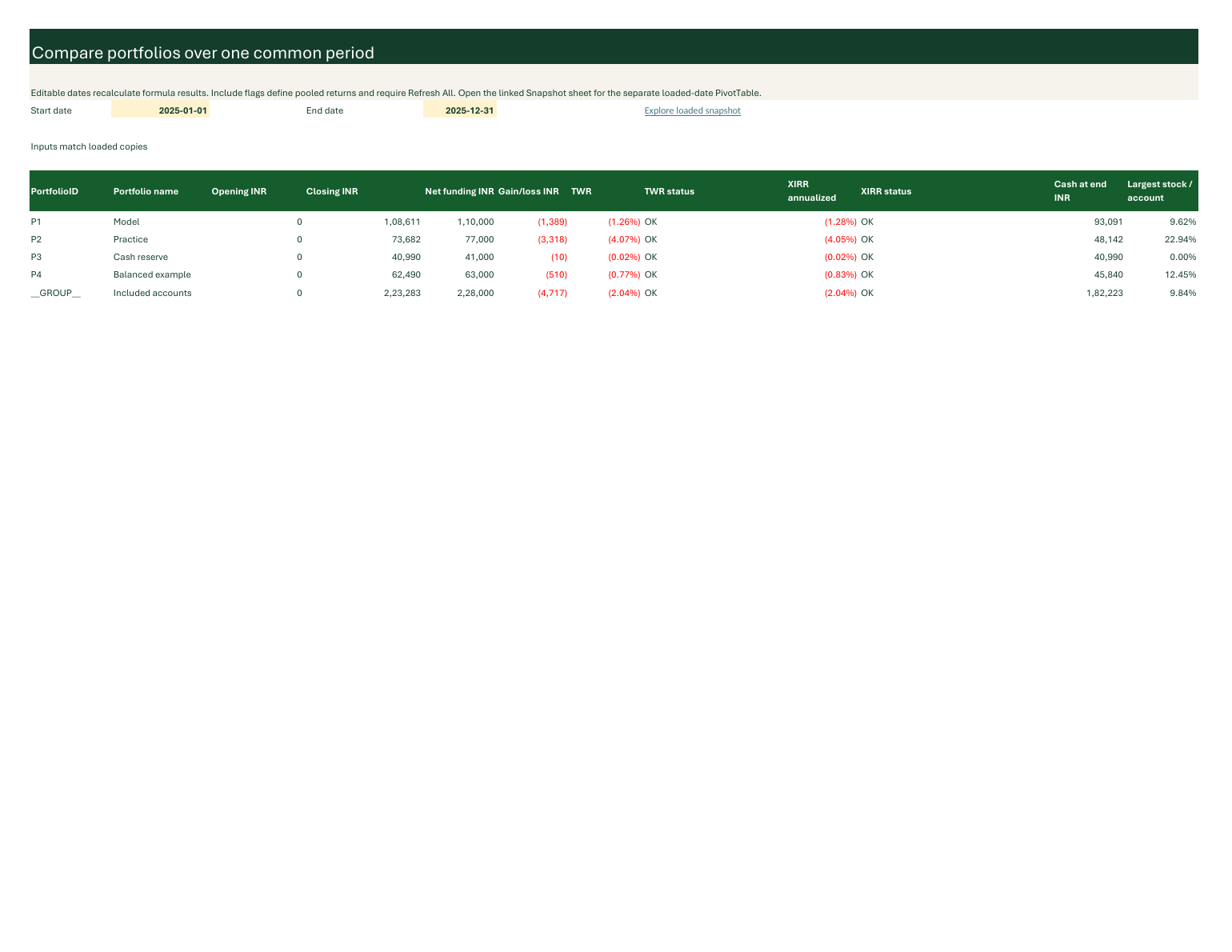
The fictional Model account ends at INR 108,611, above its first INR 100,000 deposit but below INR 110,000 net external funding. Its full-year gain/loss is −INR 1,389. Later funding explains why value above the first deposit does not establish a gain.

Decision implication

Reconcile opening value and signed funding before interpreting closing value as a gain. Inspect cash, stocks and dividend receivables separately, and read eligibility reasons before comparing returns.

Limitation

Accounts, transactions, instruments, prices, corporate actions and calendar flags are invented. This demonstrates accounting and review methods, not observed market history, actual investment performance or strategy profitability. Historical-data acquisition is on hold.

One account.
One dated reconciliation.

Select a stable account ID and a reporting date. The captured native/reference outputs retain eligibility, missing values and reasons.

All values are fictional. Missing required prices make affected valuation unavailable; unpaid dividend entitlement is included in account value but is not spendable cash.

Start here Choose an account and date, then compare signed external funding with eligible account value.

Loading the accepted fictional 2025 accounting exhibit…

The native Comparison sheet owns selected-period returns. This browser exhibit is a dated accounting view.

Funding and eligible value

Read the reconciliation

Account value = cash + stock value + unpaid dividend entitlement. Deposits, withdrawals and individual-account transfers are funding. Dividend payment converts a receivable to cash without a second gain.

Five analyst views.
A separate snapshot.

Use the native workbook to inspect and edit its underlying tables and calculations. A screenshot is a preview, not an interactive Excel replacement.

  1. StartRead the fictional-data boundary, input state, refresh scope and task links.
  2. ComparisonChoose a common period; inspect funding, gain/loss and reasoned TWR/XIRR eligibility. Include flags define the pooled group after refresh.
  3. DetailChoose a stable account ID and date. Trace stock quantities, weighted-average basis, close dates, cash, receivables and keyed notes.
  4. ReviewInspect the owning rules and affected records. Correct inputs before refreshing; a draft plan is not a completed transaction.
  5. Data ChecksCheck input/output provenance, accounting reconciliation and duplicate note keys. Calculation validation also belongs in its owning calculation.

The separate Snapshot sheet contains one loaded date, a native PivotTable and account slicer. That slicer does not change common-period controls or pooled Include flags.

Loading the native v7 worksheet preview…

Native Microsoft 365 Excel view of the accepted fictional v7 workbook.

Select the preview to open the complete worksheet image at full size.

Accounting definitions.
Visible eligibility.

The browser export must match the hash-bound fictional fixture and native outputs. The native workbook retains the calculation and audit layers.

Accounting
Long-only stocks and cash in INR. Moving weighted-average basis includes purchase fees. Splits preserve total basis. Dividends accrue at entitlement, survive disposal and settle once into cash.
Funding timing
Known inception deposits fund the open. Later external flows occur at the close and cannot finance earlier trades. Atomic transfers net within the included group and remain external to individual accounts.
Price coverage
Use a valid close on or before the valuation date. Required missing sessions, conflicting prices and unsupported actions leave affected valuation and performance unavailable. Synthetic calendar flags are not verified exchange sessions.
Returns in Excel
Selected-period opening value is the preceding close or a known-zero inception boundary. TWR links eligible cash-flow-adjusted days. Native XIRR uses actual dates/365 and is annualized; missing signs, multiple sign changes, invalid coverage and solver failure receive unavailable reasons. The browser does not implement a second return solver.
Refresh and notes
Inputs are separate from loaded outputs. Exact provenance comparisons guard formula eligibility after edits or partial refresh. Notes use stable account/instrument keys and remain outside query-owned outputs. External-file freshness must be distinguished from a last loaded snapshot.
Acceptance scope
The downloadable v7 workbook was refreshed, recalculated and checked in Microsoft 365 Excel for Windows. All six accounting output tables matched the independent synthetic reference. Formula, expansion, source-refresh, model, slicer and save/reopen checks are recorded in the reproduction guide. Rendered views were inspected. These checks do not establish actual-device or screen-reader certification, or clean-machine reproduction.
Legacy tools
The preserved v6 Watchlist, Stock view, Trade plan and Headlines use a separate fictional 2026 dataset. They do not feed the new 2025 accounting model. Production RSS and live prices are not part of this accepted synthetic scope.
Open and reproduce
the fictional case.

The workbook and reproduction package use the same verified fictional 2025 inputs and native accounting outputs.

Included

V7 workbook, authored fictional inputs, calculations, methods and checksums. The original v6 is preserved separately.

Software

Microsoft 365 Excel for Windows for the native workflow. Verification/reproduction tool requirements belong in the package guide.

Full replay

No market account or third-party historical dataset is required for the fictional example. Historical acquisition is on hold.

Analyst workbook v7

Four fictional accounts, three stocks and all 365 dates of 2025. Native formulas, Power Query, a Data Model, PivotTable and slicer are included.

Download analyst workbookXLSX · 2,310,098 bytes

V7 reproduction package

Versioned authored inputs, build scripts, independent calculations, a native-verification summary and checksums for this exact workbook. See README for replay requirements and measured scope.

Download v7 reproduction ZIPZIP · 2,459,850 bytes