Reported departments
Labels remain distinct; a blank department becomes Unallocated. Renamed departments are not silently merged.
02 / Excel & public spending
A native Excel workbook for tracing published expenditure, investigating classifications and checking source exceptions.
Two years of published supplier and procurement-card reports. Publication month defines each comparison, rather than transaction-date completeness.
Start here Switch publication stream to compare supplier and procurement-card views. The streams remain separate.
Loading independently reconciled source aggregates…
Labels remain distinct; a blank department becomes Unallocated. Renamed departments are not silently merged.
Signed amounts, including negative entries. Procurement-card tax and gross remain distinct from net.
These disclosure cohorts are not complete council expenditure. Supplier and card streams have unverified overlap and must never be added together. Published rows are not invoice or purchase counts.
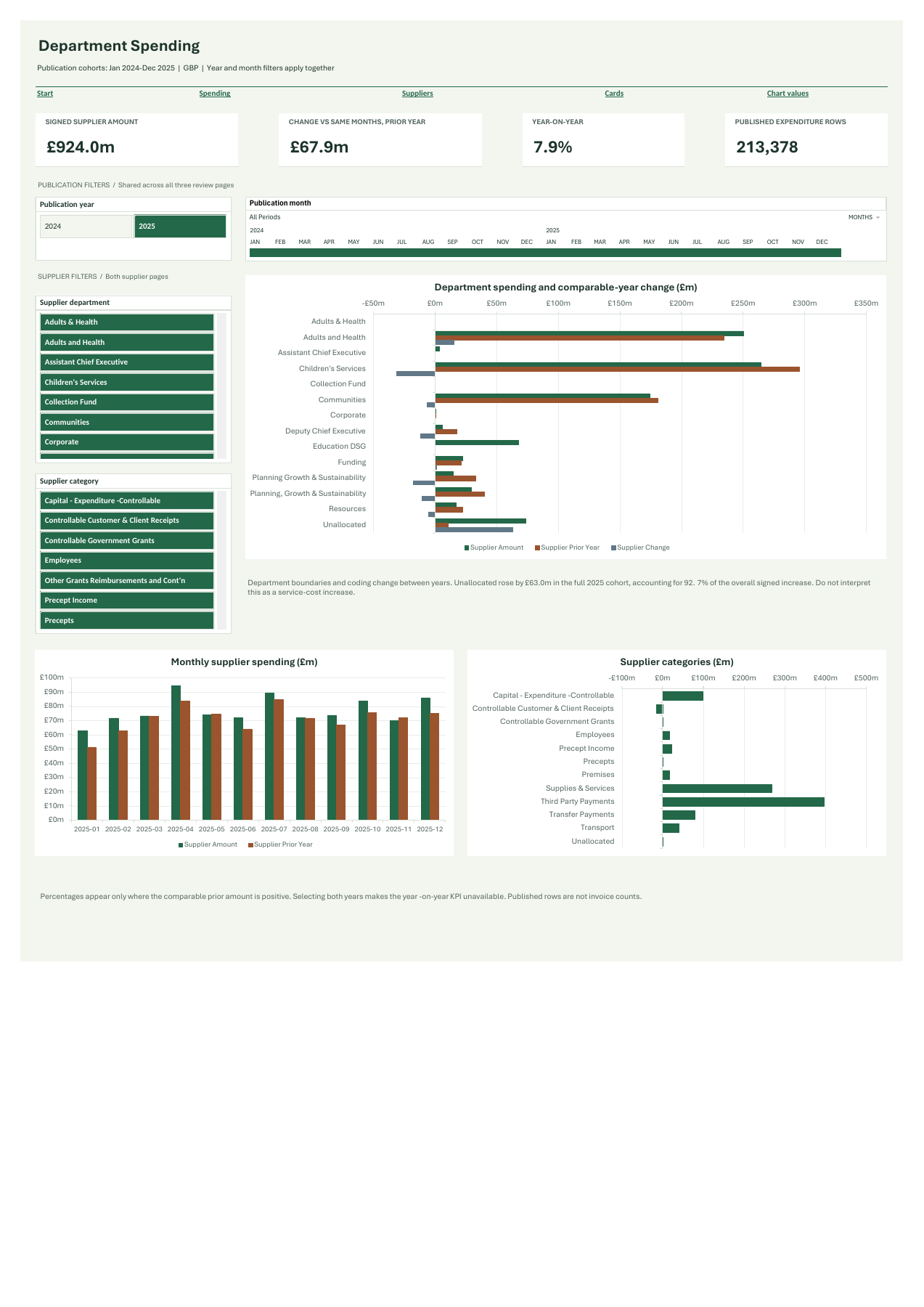
Fixed worked example: supplier publications, 2025 vs 2024. Filters above do not change these figures.
The most useful investigation begins by checking what a change actually represents.
The blank-department increase accounts for most of the overall signed growth. This identifies a classification problem for departmental interpretation. It does not establish a funding decision, a service cut or the cause of the missing classifications.
Before drawing departmental conclusions, an analyst should investigate the source coding and any boundary changes. The workbook leaves the original labels and Unallocated amounts visible.
January and February 2025 supplier reports require verified date/document-column exchanges. One February source-total row exactly repeats the month's expenditure and is excluded from the analytical rows. Empty records and verified zero sentinels are classified separately.
All other signed expenditure records, including repeated-looking and negative rows, remain. The 89 card net-plus-tax versus gross differences are review flags, without invented corrections or misconduct claims.
Power Query, a relational Data Model, DAX measures, PivotCharts, slicers and detail tables. No macro, server or external runtime is needed to use the workbook.
Unchanged v0.2 native Excel export. Open the image for full-size inspection.
The workbook retains its 29 September 2026 technical review. The portfolio package independently rechecked the 48 raw-file hashes, source calculations and selected aggregates. It did not repeat native Excel refresh or human keyboard/screen-reader acceptance.
Use 64-bit Microsoft 365 Excel for Windows. Download the workbook and its companion to reproduce the native workflow.
Native Excel workbook included. Use desktop Excel to inspect its model.
Excel for Windows for the native workbook. Python companion for checks.
Exact workbook available here; historical native acceptance remains unchanged.
Unchanged v0.2 workbook with saved data, native controls and embedded instructions. Approximately 56 MB.
XLSX · 58.8 MB · verified before savingAll 48 original CSVs, source URLs and hashes, actual M definitions, retained baseline and a portable calculation checker.
Download companion ZIPZIP · 4.9 MBPython 3.11 or newer, standard library only. Recompute source controls and the browser tables without opening Excel.
python reproduce.py
Run from the extracted companion directory. This check does not automate Excel.